Hi All,
Greetings.
Continuing our PowerShell journey, today we will explore the Microsoft Teams PowerShell module.
Details:
What is Microsoft Teams PowerShell Module?
- Microsoft Teams PowerShell module is a set of cmdlets for managing Teams directly from the PowerShell command line.
- PowerShell CMDLETs are available for automation that can be leveraged to manage all aspects of Teams administration, including users, teams, policies, and configuration.
- Microsoft Teams 7.9.0 is latest PowerShell version for Microsoft Teams.
- We could install latest version of Microsoft Teams PowerShell module using the command – Install-Module
Install-Module -Name MicrosoftTeams -RequiredVersion 7.9.0


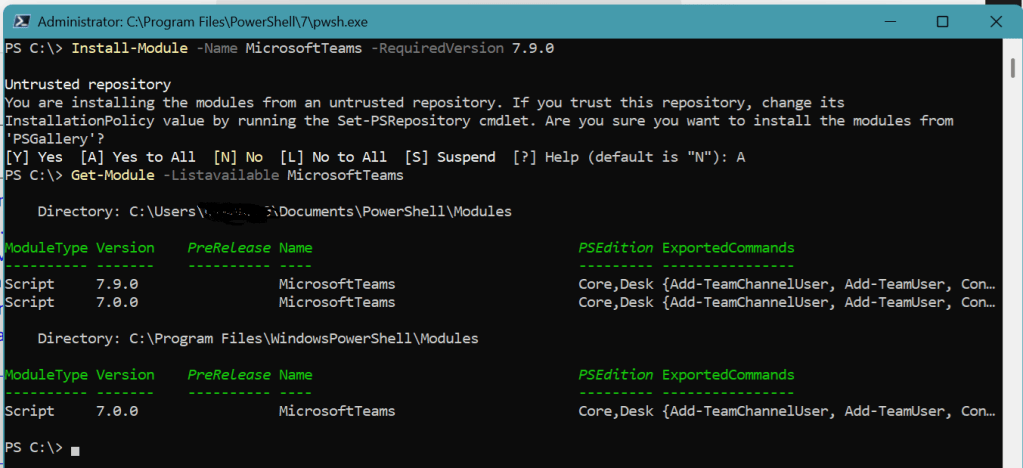
- Once we successfully install Teams module, we are ready to execute Teams PowerShell CMDLETs.
- Important Note – Before executing any Teams CMDLET we need to execute – “Connect-MicrosoftTeams” CMDLET

- Once we are successfully connected to Teams, we are ready to execute the Teams PowerShell CMDLETs.
PS C:\> Connect-MicrosoftTeamsAccount Environment Tenant TenantId------- ----------- ------ --------prasham@knowledgejunction1.onmicrosoft.com AzureCloud 6b38e1c3-a1fe-40cc-8b93-a4159a50592c 6b38e1c3-a1fe-40cc-8b93-a4…PS C:\> Get-TeamGroupId DisplayName Visibility Archived MailNickName Description------- ----------- ---------- -------- ------------ -----------04a8dd12-ee13-418a-afaa-05ed3b9674fb LIFE IS BEAUTIFUL Private False LIFEISBEAUTIFUL Teams for enjoyin…PS C:\>
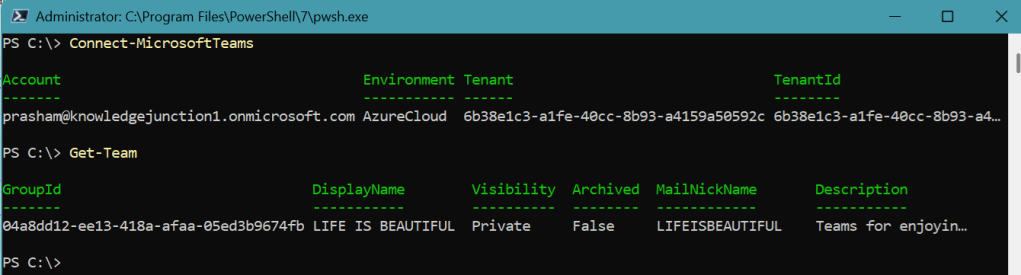
- Here, in above example we are calling – Get-Team teams PowerShell CMDLET.
- Get-Team CMDLET returns all the teams in my tenant.
We can also install Microsoft PowerShell Teams module from – https://www.powershellgallery.com/packages/MicrosoftTeams/
Important points to remember
- All of these cmdlets can be run as end users, but they work only on the teams that we own or are a member of.
- If we are a Global Administrator or Teams Administrator, we can act on all teams in our organization.
References

